Home / Odoo
Your books are clear, from invoice to report
Invoices, expenses, payments and reports in one system, with e-invoicing set up for your company's phase.
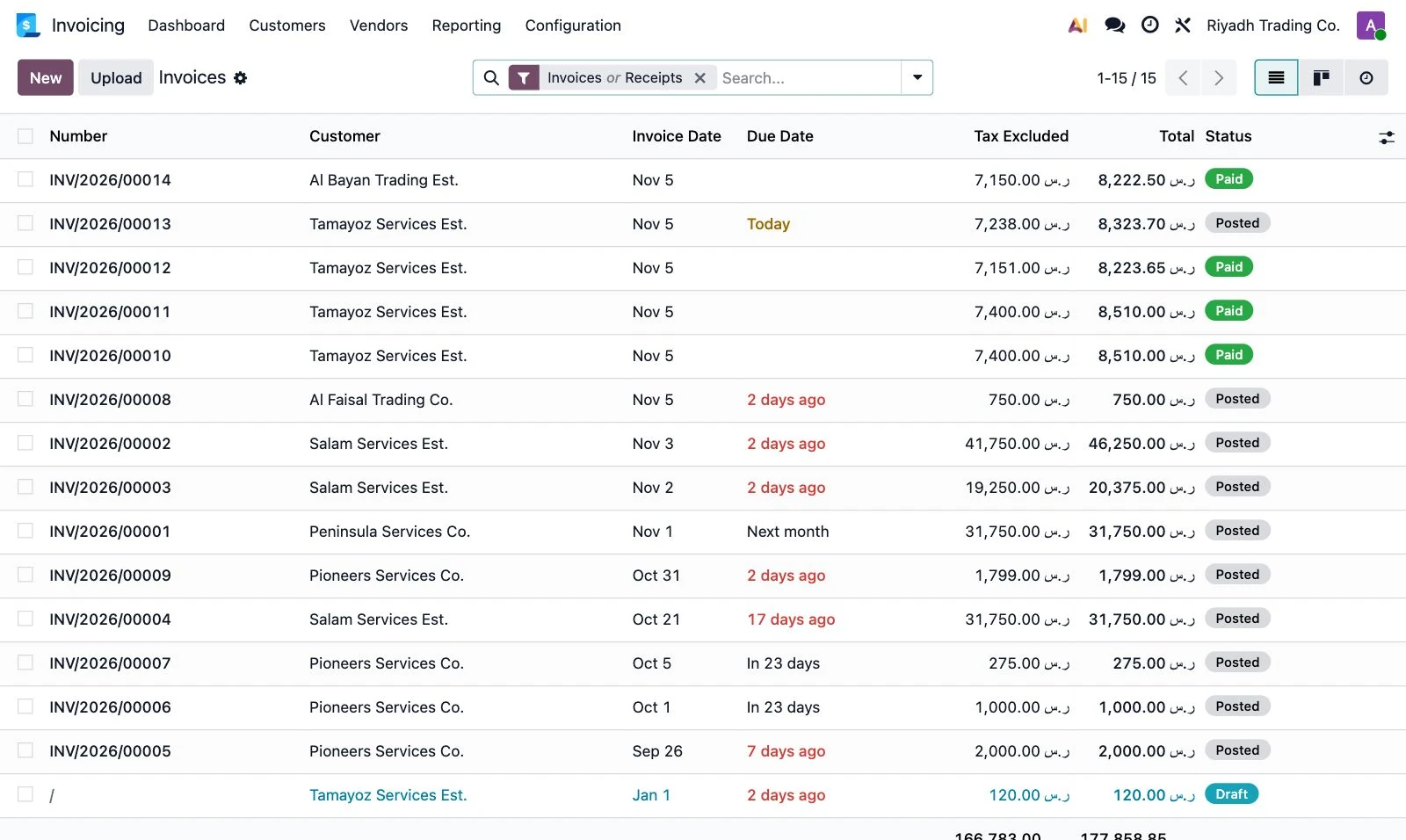
An Odoo 19 screen with sample data.
Every invoice in its place
Create invoices and follow what is due from one screen, so late payers show up before your cash flow feels it.
See totals with and without tax in the same list.
From draft to a finished invoice
Confirmed inside the systemConfirm the invoice inside the system, and its file comes out with tax calculated.
E-invoicingWe set up e-invoicing for the phase your company needs, and test samples before go-live.
Bank reconciliation, from one screen
Bank linkSee the account balance, the latest statement and the transactions waiting to be reconciled.
Payment matchingReconciliation shows bank transactions next to open invoices, so you match each one to its entry.
Decisions from your own numbers
Revenue, expense and profit reports from your actual data, ready when management needs them.
Open any line to see what sits under it.
All the features, in one system
Budgets
Prepare budgets and follow the company's financial performance.
Expenses
Record expenses and link them to the right accounts.
Tax reports
Prepare tax reports from the system's data.
Revenue
Follow and analyze revenue sources.
Automation
Automate repeated tasks such as reconciling invoices and payments.
Integration
Connect accounting with sales, inventory and purchasing.
How we implement it
- We study your financial cycleAccounts, taxes, branches and approvals.
- We set up the systemChart of accounts, taxes and e-invoicing.
- We move your data and testBalances, customers and vendors, tested before go-live.
- We train your team and stayHands-on training, and support after go-live in Arabic.
Ready to start with your accounts?
Tell us about your company, and we will map your accounting path on Odoo.
Book a consultationFootage from Odoo 19, with demo data.


 Odoo overview
 Odoo customization
 Odoo support
 Odoo training
 CRM